ChatGPT
 Perplexity
 Claude
 Google AI
 Grok
Grok
Summarize this article with an AI assistant.
Meesho Seller Login: A Complete Guide for Sellers

Key Takeaways:
- Quick registration and easy setup to get started on Meesho.
- Manage products, inventory, orders, and returns through the seller dashboard.
- Access Meesho seller support for help with any issues.
- Optimize product listings with quality images, descriptions, and keywords to increase visibility.
- Stay informed and compliant with Meesho’s policies to ensure business growth.

Selling on Meesho presents an exciting opportunity to tap into a vast audience and grow your business exponentially. With its user-friendly platform and a robust community of sellers and buyers, Meesho has firmly established itself as a favorite among entrepreneurs looking to expand their online presence.
By 2026, the platform is anticipated to further expand its reach and abilities, providing sellers with distinct tools and resources to thrive.
If you're contemplating selling on Meesho this year, this guide will walk you through every essential step, from the initial Meesho seller registration and meesho seller login to effectively navigating the Meesho seller dashboard.
The journey to becoming a successful seller on Meesho begins with a straightforward registration process. Designed to be quick and hassle-free, this process ensures that you can start selling with minimal delays. Here's a detailed guide to help you get started:
Step 1: Visit the Meesho Seller Portal
Start your journey by visiting the official Meesho website. Look for the seller registration link prominently displayed on the homepage. Alternatively, you can go directly to the Meesho seller portal, a dedicated space designed to cater to potential and existing sellers. The portal is your starting point for all things related to your Meesho business, from registration to managing sales.
Step 2: Sign Up and Create Your Account
Once on the portal, click on the 'Sign Up' option to initiate the creation of your Meesho seller account. The sign-up form requires basic information such as your name, email address, and phone number. This step is crucial as it sets the foundation for your business on Meesho. Ensure that the details you provide are accurate and up-to-date to avoid any future discrepancies.
Step 3: Verify Your Details
After submitting your initial information, Meesho will send a verification code to your registered email or phone number. This step is critical in ensuring the authenticity of your account. Enter the code promptly to complete the verification process. This security measure is designed to protect both sellers and buyers on the platform.
Step 4: Complete Your Profile
With your account verified, the next step is to fill in additional details about your business. This includes your business name, physical address, and GSTIN (if applicable). Providing comprehensive and accurate information at this stage is important as it reflects on your business's credibility and professionalism. A complete profile helps build trust with potential buyers.
Step 5: Upload Necessary Documents
Depending on the nature of your business, you may be required to upload specific documents for verification. These documents could include your business registration certificate, GST certificate, and valid identity proof. Ensuring that all documents are in order and submitted promptly facilitates a smoother registration process and reduces the time taken to start selling.
Step 6: Set Up Your Meesho Seller Account
Once your documents have been verified, you will gain access to log in to your Meesho seller account. This is the final step before you can start setting up your online store. From here, you can begin customizing your store, adding products, and preparing to engage with customers. The seller account setup is intuitive, allowing you to focus on what matters most---growing your business.
Understanding the Meesho Seller Dashboard
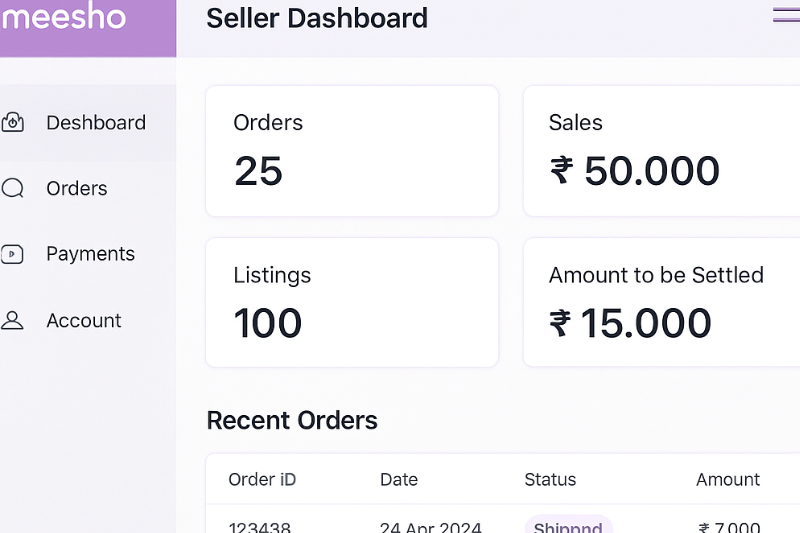
Upon successful registration, you will have access to the Meesho seller dashboard. This dashboard is a powerful tool, acting as the central hub for managing all aspects of your Meesho business. Understanding its functionalities is key to maximizing your selling potential.
Manage Your Products Effectively
- Add Products: Begin by uploading high-quality images and detailed product descriptions. Accurate pricing details and optimized listings with relevant keywords can significantly increase your product's visibility. Consider market trends and customer preferences when adding new products to ensure they meet the demand.
- Inventory Management: Keeping track of your stock levels is crucial. The dashboard offers tools to help you monitor inventory in real-time, ensuring popular items are always available. Implementing an efficient inventory management system can prevent stockouts and overstock situations.
- Product Categorization: Properly categorize your products to enhance discoverability. The dashboard allows you to organize products into categories and subcategories, making it easier for customers to find what they are looking for. A well-organized product catalog can improve the shopping experience and boost sales.
Streamline Order Management
- Track Orders: The dashboard provides a comprehensive view of all incoming orders. You can monitor each order's progress, from placement to delivery. Efficient order tracking ensures timely fulfillment and enhances customer satisfaction.
- Process Returns: Handling returns effectively is crucial for maintaining a positive seller rating. The dashboard simplifies return management by providing tools to process requests quickly and efficiently. A streamlined returns process can help mitigate negative feedback and retain customer trust.
- Order Fulfillment Insights: Gain valuable insights into your order fulfillment process. The dashboard offers analytics that helps identify bottlenecks and areas for improvement, allowing you to optimize operations and reduce fulfillment times.
Access Meesho Seller Support
Meesho is committed to supporting its sellers at every step. If you encounter any issues, the dashboard provides direct access to Meesho seller support. Whether you're dealing with technical problems, account issues, or have questions about selling, the support team is ready to assist. Utilizing this resource can help resolve issues swiftly and keep your business running smoothly.
Analyze Your Performance
- Sales Reports: Access detailed sales reports to gain insights into your business's performance over time. These reports provide valuable data on sales trends, helping you make informed decisions about product offerings and marketing strategies. Regularly reviewing sales data can guide your business growth.
- Customer Feedback: Customer reviews and feedback are vital for understanding what works and what needs improvement. The dashboard compiles feedback in an easy-to-analyze format, allowing you to address concerns promptly and enhance customer satisfaction.
- Performance Metrics: The dashboard also offers a range of performance metrics, including conversion rates and customer engagement statistics. These metrics can help you evaluate your marketing efforts and identify areas for strategic improvements.
Navigating the Meesho Seller Central Login
The Meesho seller central login process is designed with security and ease of use in mind. Here's how you can seamlessly log in to your Meesho seller account:
Secure Access to Your Account
The login process starts by visiting the official Meesho website. Click on the 'Seller Login' option to proceed. This step ensures that you are accessing the platform through a secure and trusted channel. Security is a top priority, and Meesho employs advanced measures to protect your account information.
Enter Your Credentials
Once on the login page, input your registered email address and password. If you have forgotten your password, the 'Forgot Password' option is available to reset it. This feature ensures that you can always regain access to your account without hassle. Regularly updating your password is recommended to maintain account security.
Access the Dashboard
After successfully logging in, you will be directed to your seller dashboard. This is your command center for managing your account and all selling activities. Familiarize yourself with the dashboard's features to take full advantage of its capabilities and manage your business efficiently.
Tips for Success on Meesho
To thrive on Meesho, it's essential to employ strategies that enhance your business's visibility and customer satisfaction. Here are some expert tips to help you succeed:
Optimize Product Listings
- Use High-Quality Images and Descriptions: Invest in professional photography and write detailed product descriptions. High-quality visuals and comprehensive information can significantly impact purchasing decisions.
- Include Relevant Keywords: Optimize your product listings with keywords that potential customers are likely to search for. This improves your products' searchability and can lead to higher visibility and sales.
- Regularly Update Listings: Stay ahead of market trends by updating your listings regularly. Take customer feedback into account and adjust your offerings to meet changing demands and preferences.
Provide Excellent Customer Service
- Promptly Respond to Inquiries: Timely responses to customer inquiries can enhance trust and improve the shopping experience. Establishing a reputation for excellent customer service can lead to repeat business.
- Handle Complaints and Returns Gracefully: Address complaints professionally and process returns efficiently. A positive resolution can turn a dissatisfied customer into a loyal one and protect your seller rating.
- Encourage Positive Reviews: Satisfied customers are more likely to leave positive reviews. Encourage them to share their experiences, as positive feedback can attract new customers and build your brand's reputation.
Stay Updated with Meesho Policies
Meesho frequently updates its policies to improve the platform's user experience. Staying informed about these changes is crucial for ensuring compliance and avoiding disruptions. Regularly review the platform's updates and adjust your business practices accordingly to maintain a smooth selling experience.
Related Post:
1. How To Sell On Meesho Without GST
2. How To Become a Meesho Supplier: Know The Benefits Now
3. Meesho Seller Registration – A Step-by-Step Guide
4. How To Increase Meesho Sales: 10 Proven Strategies
5. Managing Your Meesho Seller Account: A Comprehensive Guide
Conclusion
Selling on Meesho in 2026 presents numerous opportunities for growth and success. By following the outlined registration steps, mastering the seller dashboard, and implementing effective selling strategies, you can build a thriving online business. Remember to leverage Meesho seller support whenever needed and continuously optimize your approach based on customer feedback and sales data. Embrace the platform's resources and stay proactive in adapting to market trends. Happy selling on Meesho!
Q. How do I register as a Meesho seller in 2026?
A. Start at the official Meesho Seller Portal, click Sign Up, and enter your basic details (name, email, phone). Verify your account via the code sent to your email/phone, then complete your profile with business information (business name, address, GSTIN if applicable). Upload the required documents (such as business registration, GST certificate, and valid ID). Once verified, set up your seller account, customize your store, add products, and you're ready to sell. The process is designed to be quick and hassle-free.
Q. Do I need a GSTIN and what documents are required?
A. A GSTIN is needed "if applicable" to your business. During registration you may be asked to upload documents like your business registration certificate, GST certificate, and a valid identity proof. Submitting accurate, complete information and providing documents promptly helps speed up verification and avoids delays.
Q. What can I manage from the Meesho seller dashboard?
A. The dashboard is your central hub. You can:
- Manage products: add listings with quality images/descriptions, set pricing, use relevant keywords, track real-time inventory, and categorize products.
- Handle orders: track end-to-end order status, process returns efficiently, and use fulfillment insights to spot and fix bottlenecks.
- Get support: access Meesho seller support directly for technical, account, or selling queries.
- Analyze performance: review sales reports, customer feedback, and key metrics like conversion and engagement to guide decisions.
Q. How do I log in, and what if I forget my password?
A. Go to the official Meesho site and select Seller Login (Seller Central). Enter your registered email and password. If you forget your password, use the Forgot Password option to reset it. Meesho emphasizes secure access, so it's wise to update your password periodically.
Q. What are the top tips to boost success on Meesho?
A. Optimize your listings with high-quality images, detailed descriptions, relevant keywords, and regular updates based on trends and feedback. Deliver excellent customer service by responding quickly, handling complaints/returns professionally, and encouraging positive reviews. Stay current with Meesho's policy updates to remain compliant, and continuously refine your strategy using sales reports, customer feedback, and performance metrics.
Supercharge your Business:
Go from surviving to tdriving!
Amplify sales witd our expert account management. Unleash your true potential now!
Call Us